Quickeys v3.0

The Ultimate System Shortcut Suite & Productivity Workspace

A lightning-fast, multi-functional slideout companion that brings rapid screen captures, deep desktop system integrations, fluid opacity layouts, and smart AI shortcuts instantly into one keypress layout.

What's New in Version 3.0

Version 3 introduces default slot recall and essential code-focused bug fixes for a more stable development workspace.

v3.0 Update

Default Slot Support

Quickeys now remembers your selected default slot when opening new tabs or restarting the app, so your most-used workspace is ready instantly.

  • Persisted slot selection across sessions
  • Faster tab launches with remembered defaults
  • Improved workflow continuity for multi-slot setups
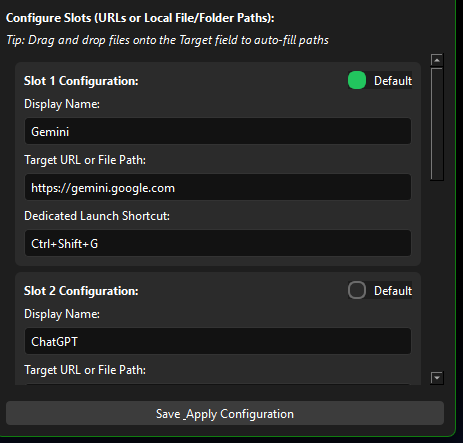
Default slot support preview image
v3.0 Bug Fixes

Code Fixes & Stability Improvements

We shipped a round of targeted bug fixes for the code editor and note workflows so the app feels more reliable while you develop and switch contexts.

  • Fixed save timing issues in note editing
  • Stabilized code preview and syntax mode transitions
  • Improved overlay behavior for smoother keyboard control
Core Foundation Layouts

The time-tested performance engines that make Quickeys your ultimate shortcut workspace companion.

Core Engine

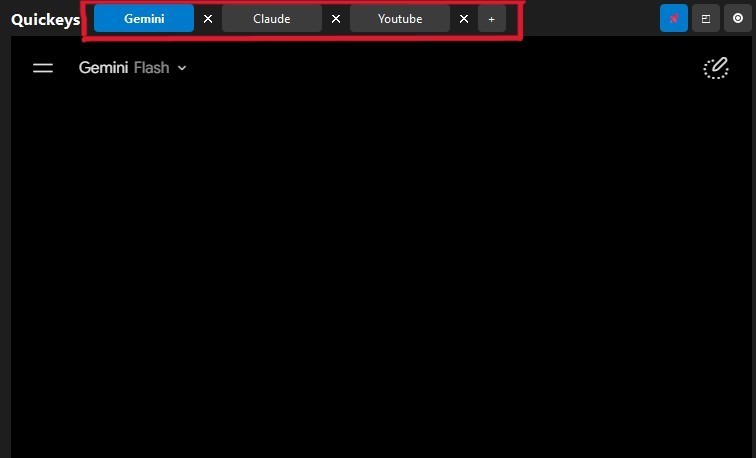
Preserve Context with Multi-Tabs

Run up to three browser contexts at the exact same time. State configuration management preserves web state cookies instantly across changes, letting you bounce between active threads effortlessly.

  • Dynamic web engine instances
  • Isolated standard cookies profile allocation
  • Fast inline tab control button strip
Multi-tab support configuration panel display interface
Advanced Layouts

Compare Logic Side-by-Side

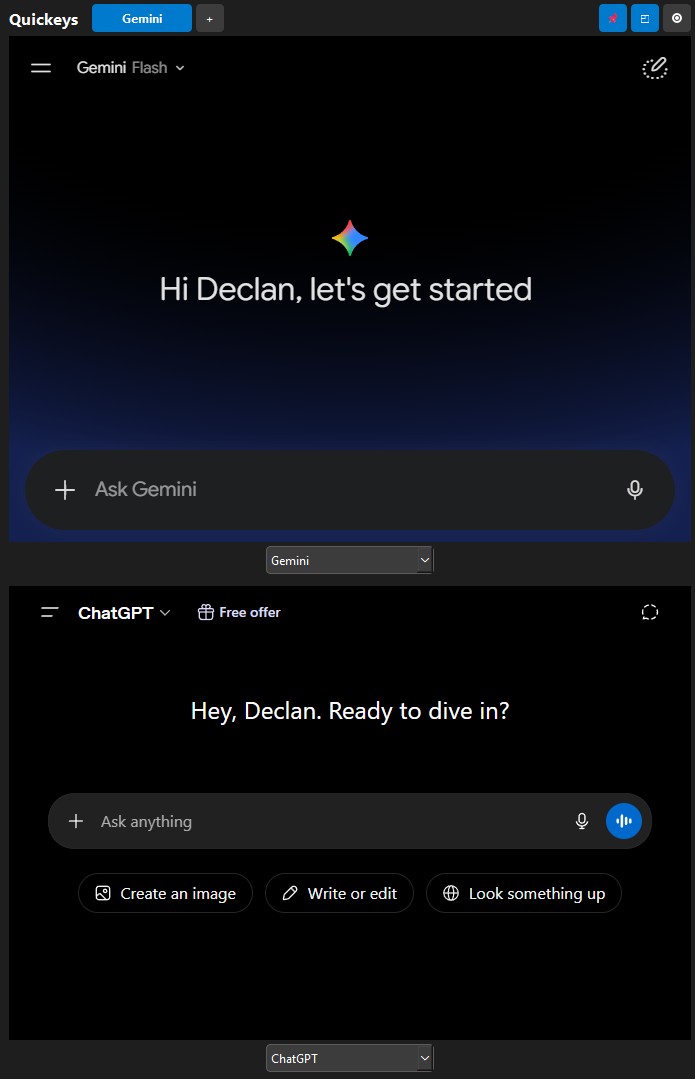
Activate the Native Cross-Split View mode to partition the side window panel. Load Gemini in the top screen zone and ChatGPT or custom documentation sources at the bottom to easily evaluate model outputs side by side.

  • Draggable split divider line controller
  • Separate slot assignments per layout quadrant
  • Clean interface with hidden control panels
Dual screen split container running separate engine modules
Shortcut Suite

Fully Tailored Hotkey Bindings

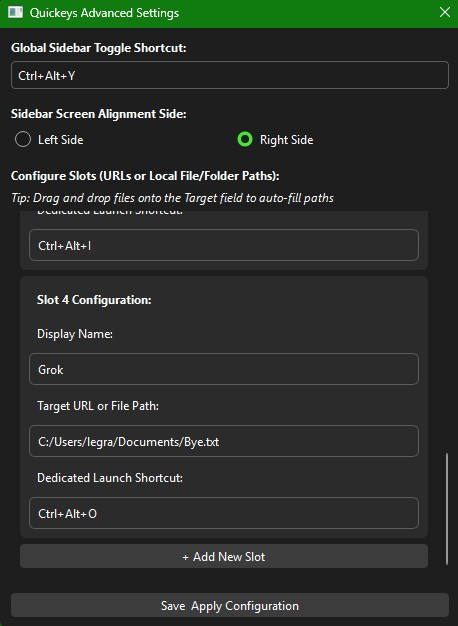
Take full control of your app shortcuts. Assign a unified system key pattern to slide the window frame open or closed, and create dedicated triggers to load specific web app links on the fly.

  • Low-level hardware hook event listeners
  • Customizable sidebar placement (Left or Right sides)
  • Conflict-free key configuration editor
Advanced key mapping and window alignment options screen
OS Integrations

Execute System File Formats Locally

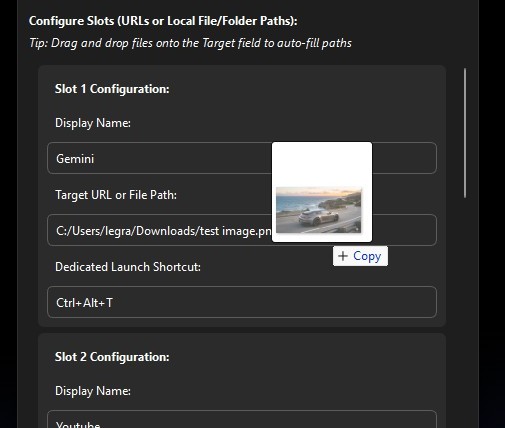
Quickeys handles more than just web links. Map local application configurations, folders, or document files directly into empty slot targets. Drag and drop any asset right into your settings fields to automatically load the resource path.

  • Drag and drop target mapping parsing
  • Launches native external programs on trigger events
  • Auto-closes the sidebar panel on execution to keep you in your flow
Drag and drop file paths integration module inside preferences
Core Feature

Built-in Notepad & Code Scratchpad

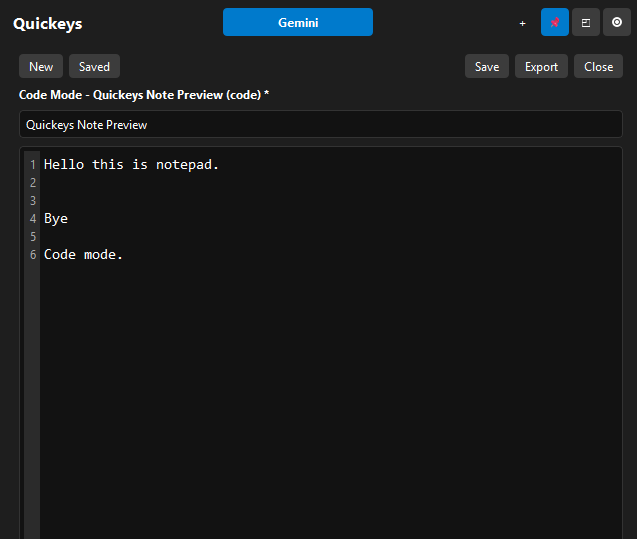
An isolated markdown documentation notebook and development editor built natively into your overlay utility frames. Instantly dump complex text blocks, write code snippets, or store temporary links without launching external text tools.

  • Dynamic line-number tracking gutters for clean code reading
  • Natively integrated file actions to create, clear, and save notes
  • Persistent local layout state management that keeps text safe
Built in notepad and code scratchpad workspace display interface
Core Feature

Instant Clipboard Screen Snipping

Capture critical desktop definitions instantly. Trigger the all-new precision crop box tool to snap a pixel-perfect image copy of any active coordinate on your screen layout and push it straight into your clipboard memory.

  • Draggable rubber-band marquee crop framing filters
  • Saves immediately to your operating system's native clipboard
  • Zero file bloat—paste images instantly straight into code tools or chats
Precision screen snipping capture bounding frame tracking tool
Core Feature

Adjustable Window Opacity Filter

Keep your critical desktop background context perfectly visible. Use the newly integrated, real-time opacity slider element to seamlessly adjust the overlay frame transparency from thick down to see-through.

  • Fluid window transparency tracking mapping layers
  • Review documentation or app states hidden behind your layout
  • Maintains structural frame focus integrity across all alpha channels
Adjustable window opacity slider control demonstrating transparency properties
Core Stability

Settings Overhauls & Anti-Crash Architecture

We've completely re-engineered core background listener models to stop sudden process drops and optimize file storage rules. Preferences now save safely to stable system registry routes.

  • Patched preferences menu to prevent setting layout freezes
  • Asynchronous file handling to stop download crashes on multi-tabs
  • Low-level hardware filters tracking PC sleep and workstation wakes

Frequently Asked Questions

Everything you need to know about Quickeys workflow capabilities.

How do I keep Quickeys visible while working in another app?

Click the Pin icon (📌) at the top right of the navigation header. This locks the application window to a topmost layer mode, ensuring it stays visible over other software windows.

Can I launch local scripts, codebases, or directories through this?

Yes. If you input a path instead of a URL into a slot configuration, Quickeys uses your operating system's native execution tools to launch it, closing the sidebar automatically so you can get straight to work.

Does the application load automatically when my computer boots?

Yes, Quickeys can be set to run automatically on system startup. It launches minimized to your system tray, waiting in the background until you press your global shortcut key sequence.

Where are my login details and session cookies stored?

Quickeys uses a secure, isolated profile directory on your local machine to store your sessions. It keeps your login states safe without sending data to any external cloud sync tools.